

برای دریافت و اجرای reportهای تکproject که در دسترس APIقرار گرفتهاند، از روشهای زیر استفاده کنید.
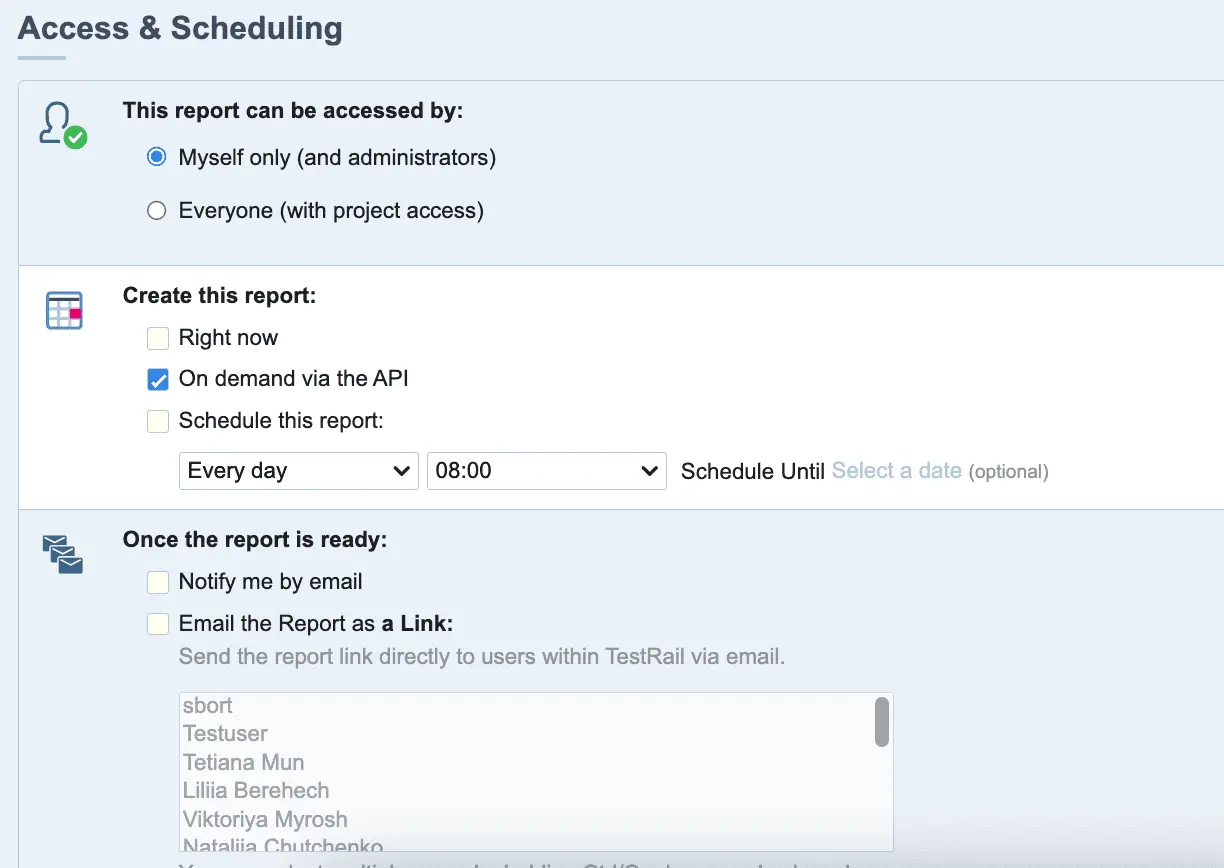
قبل از دسترسی به report از طریق endpointهای API، باید report خود را در دسترس APIقرار دهید. برای این کار، یک report جدید بسازید و گزینه Create this report: On-demand via the API را انتخاب کنید.
#
بعد از ذخیره report، دیگر نمیتوانید تنظیمات Create this report: را تغییر دهید. بنابراین نمیتوانید reportهای زمانبندیشده موجود را طوری تغییر دهید که از طریق APIدر دسترس باشند.
بعد از ساخت report و انتخاب گزینه On-demand via the API ، report در تب API Templates section و کنار reportهای دیگر نمایش داده میشود.
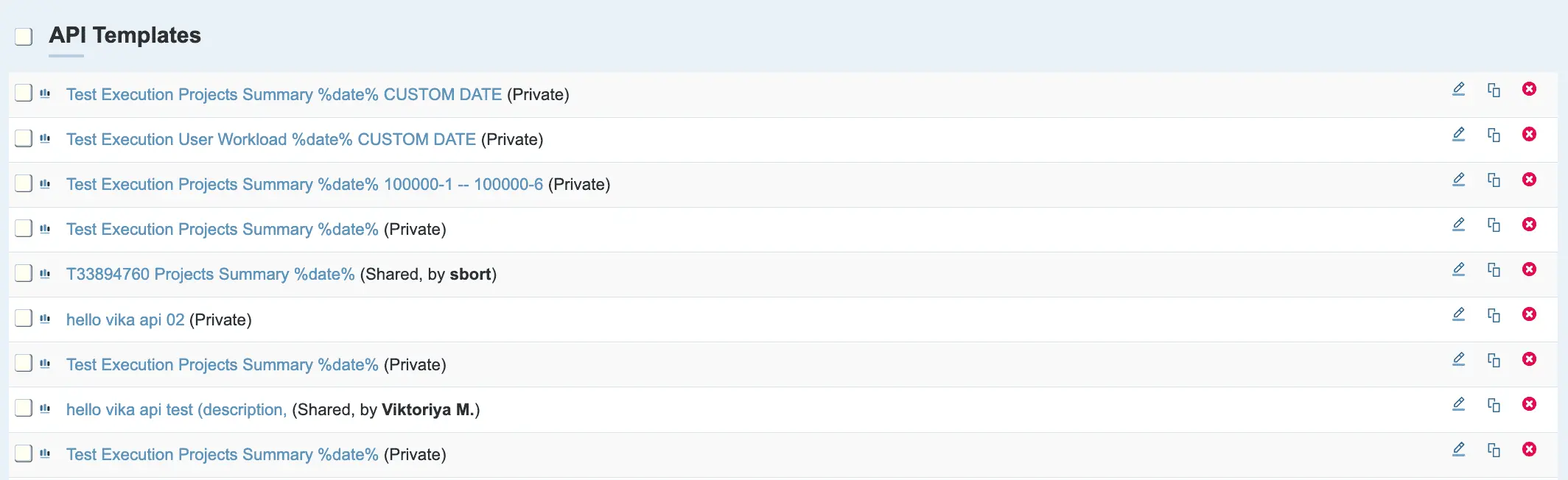
reportهای موجود در API Templates section را میتوانید با endpointهای API که در ادامه توضیح داده شدهاند ببینید و اجرا کنید.
#
ممکن است report بلافاصله پس از اجرا در دسترس نباشد. مدتزمان آماده شدن report میتواند متفاوت باشد، بهخصوص برای مشتریان TestRail Server.
get_reports #
فهرست reportهای تکproject قابل دسترسی از طریق API را برای یک project برمیگرداند.
GET index.php?/api/v2/get_reports/{project_id}Parameters #
| Name | Type | Required | Description |
|---|---|---|---|
| project_id | integer | true | ID پروژهای که میخواهید فهرست reportهای قابل دسترسی از طریق API را برای آن دریافت کنید |
Response content #
برای نمونهای از response معمول، بخش زیر را ببینید:
[
    {
        "id": 1,
        "name": "Activity Summary (Cases) %date%",
        "description": null,
        "notify_user": true,
        "notify_link": false,
        "notify_link_recipients": null,
        "notify_attachment": false,
        "notify_attachment_recipients": "person1@example.com\r\nperson2@example.com",
        "notify_attachment_html_format": false,
        "notify_attachment_pdf_format": false,
        "cases_groupby": "day",
        "changes_daterange": "5",
        "changes_daterange_from": null,
        "changes_daterange_to": null,
        "suites_include": "1",
        "suites_ids": null,
        "sections_include": "1",
        "sections_ids": null,
        "cases_columns": {
            "cases:id": 75,
            "cases:title": 0,
            "cases:created_by": 125,
            "cases:updated_by": 125
        },
        "cases_filters": null,
        "cases_limit": 1000,
        "content_hide_links": false,
        "cases_include_new": true,
        "cases_include_updated": true
    }
]
فیلدهای سیستمی زیر همیشه در response وجود دارند:
| Name | Type | Description |
|---|---|---|
| id | integer | ID یکتای report |
| name | string | نام report |
| description | string | توضیح report |
| notify_user | boolean | مشخص میکند آیا پس از اجرای report، نویسنده باید مطلع شود یا نه |
| notify_link | boolean | مشخص میکند آیا ایمیلهایی همراه با لینک report ارسال شوند یا نه |
| notify_link_recipients | string | فهرست کاربرانی که report باید برای آنها ارسال شود |
| notify_attachment | boolean | مشخص میکند آیا report باید بهصورت attachment ایمیل شود یا نه |
| notify_attachment_html_format | boolean | مشخص میکند اگر notify_attachment برابر true باشد، report با فرمت HTML ایمیل شود یا نه |
| notify_attachment_pdf_format | boolean | مشخص میکند اگر notify_attachment برابر true باشد، report با فرمت PDF ایمیل شود یا نه |
Response codes #
| Status Code | Description |
|---|---|
| 200 | موفقیتآمیز؛ reportها در response برگردانده میشوند |
| 400 | project نامعتبر یا ناشناخته است |
| 403 | به این project دسترسی ندارید |
| 429 | فقط TestRail Cloud— درخواستها بیش از حد مجاز است (ببینید API rate limit) |
#
run_report #
#
این endpoint به TestRail ۵.۷ یا نسخههای جدیدتر نیاز دارد.
report مشخصشده با report_id parameter را اجرا میکند و URLهای لازم برای دسترسی به report در فرمت HTML و PDF را برمیگرداند.
GET index.php?/api/v2/run_report/{report_template_id}Response content #
{
    "report_url": "https://docs.testrail.com/index.php?/reports/view/383",
    "report_html": "https://docs.testrail.com/index.php?/reports/get_html/383",
    "report_pdf": "https://docs.testrail.com/index.php?/reports/get_pdf/383"
}
Response codes #
| Status Code | Description |
|---|---|
| 200 | موفقیتآمیز؛ reportها در response برگردانده میشوند |
| 400 | ID مربوط به report template نامعتبر است |
| 403 | به این project دسترسی ندارید |
| 429 | فقط TestRail Cloud— درخواستها بیش از حد مجاز است (ببینید API rate limit) |
get_cross_project_reports #
همه reportهای بینproject قابل دسترسی از طریق API را که کاربر به آنها دسترسی دارد برمیگرداند؛ این قابلیت فقط برای Enterprise license plans در دسترس است.
GET index.php?/api/v2/get_cross_project_reports/Parameters #
parameter ورودی ندارد.
#
Response content #
برای نمونهای از response معمول، بخش زیر را ببینید:
[
    {
        "id": 1,
        "name": "Test Execution Projects Summary %date%",
        "description": null,
        "project_ids": [],
        "include_open_milestones": true,
        "include_completed_milestones": true,
        "include_open_runs_and_plans": true,
        "include_completed_runs_and_plans": true,
        "report_timeframe": "90 days",
        "included_statuses": "Passed, Blocked, Untested",
        "content_hide_links": false,
        "notify_user": true,
        "notify_link": false,
        "notify_link_recipients": null,
        "notify_attachment": false,
        "notify_attachment_recipients": "person1@example.com\r\nperson2@example.com",
        "notify_attachment_html_format": false,
        "notify_attachment_pdf_format": false
    },
    {
        "id": 2,
        "name": "Test Execution User Workload %date%",
        "description": null,
        "user_ids": [],
        "project_ids": [],
        "report_timeframe": "90 days",
        "include_open_runs_and_plans": true,
        "include_completed_runs_and_plans": true,
        "include_elapsed_test_time": true,
        "include_estimated_test_time": true,
        "sort_by": "alphabetical",
        "content_hide_links": false,
        "notify_user": true,
        "notify_link": false,
        "notify_link_recipients": null,
        "notify_attachment": false,
        "notify_attachment_recipients": "person1@example.com\r\nperson2@example.com",
        "notify_attachment_html_format": false,
        "notify_attachment_pdf_format": false
    }
]
فیلدهای سیستمی زیر همیشه در response وجود دارند:
| Name | Type | Description |
|---|---|---|
| id | integer | ID یکتای report |
| name | string | نام report |
| description | string | توضیح report |
| project_ids | list | فهرست IDهای project موجود در report |
| user_ids | list |
فهرست IDهای کاربر موجود در report فقط برای User Workload در دسترس است |
| include_elapsed_test_time | boolean |
مشخص میکند زمان سپریشده test در report لحاظ شود یا نه فقط برای User Workload در دسترس است |
| include_estimated_test_time | boolean |
مشخص میکند زمان تخمینی test در report لحاظ شود یا نه فقط برای User Workload در دسترس است |
| sort_by | string |
گزینه مرتبسازی انتخابشده را شامل میشود فقط برای User Workload در دسترس است |
| include_open_milestones | boolean | مشخص میکند milestoneهای باز در report لحاظ شوند یا نه |
| include_completed_milestones | boolean | مشخص میکند milestoneهای تکمیلشده در report لحاظ شوند یا نه |
| include_open_runs_and_plans | boolean | مشخص میکند test runها و test planهای باز در report لحاظ شوند یا نه |
| include_completed_runs_and_plans | boolean | مشخص میکند test runها و test planهای تکمیلشده در report لحاظ شوند یا نه |
| report_timeframe | date | بازه زمانی انتخابشده برای اجرای report |
| included_statuses | list | statusهای انتخابشده برای اجرای report |
| notify_user | boolean | مشخص میکند آیا پس از اجرای report، نویسنده باید مطلع شود یا نه |
| notify_link | boolean | مشخص میکند آیا ایمیلهایی همراه با لینک report ارسال شوند یا نه |
| notify_link_recipients | string | فهرست کاربرانی که report باید برای آنها ارسال شود |
| notify_attachment | boolean | مشخص میکند آیا report باید بهصورت attachment ایمیل شود یا نه |
| notify_attachment_html_format | boolean | مشخص میکند اگر notify_attachment برابر true باشد، report با فرمت HTML ایمیل شود یا نه |
| notify_attachment_pdf_format | boolean | مشخص میکند اگر notify_attachment برابر true باشد، report با فرمت PDF ایمیل شود یا نه |
Response codes #
| Status Code | Description |
|---|---|
| 200 | موفقیتآمیز؛ reportها در response برگردانده میشوند |
| 403 |
فقط TestRail Enterprise. دسترسی رد شد. نقش کاربر اجازه دسترسی نمیدهد. |
| 429 |
فقط TestRail Cloud— درخواستها بیش از حد مجاز است (ببینید API rate limit) |
#
run_cross_project_report #
report مشخصشده با report_template_id parameter را اجرا میکند و URLهای لازم برای دسترسی به report در فرمت HTML و PDF را برمیگرداند؛ این قابلیت فقط برای Enterprise license plans در دسترس است.
GET index.php?/api/v2/run_cross_project_report/{report_template_id}Response content #
{
    "report_url": "https://docs.testrail.com/index.php?/cross_project_reports/view/383",
    "report_html": "https://docs.testrail.com/index.php?/cross_project_reports/get_html/383",
    "report_pdf": "https://docs.testrail.com/index.php?/cross_project_reports/get_pdf/383"
}
Response codes #
| Status Code | Description |
|---|---|
| 200 | موفقیتآمیز؛ reportها در response برگردانده میشوند |
| 400 | ID مربوط به report template نامعتبر است |
| 403 | به این project دسترسی ندارید |
| 429 | فقط TestRail Cloud— درخواستها بیش از حد مجاز است (ببینید API rate limit) |


